Usage
Everything TAI can do on a first meeting, and the keys that reach it. For what happens underneath, read architecture.md.
Install
curl -fsSL https://raw.githubusercontent.com/mlibre/Terminal-AI-Helper/main/install.sh | bashnpm is a door to the same install: npm i -g terminal-ai-helper@latest --allow-scripts=terminal-ai-helper unpacks the same files and runs the same installer itself, and tai update knows an npm install and updates it from the registry — and retargets a plugin line an older install left behind, the mismatch tai version names.
The line downloads TAI to ~/.tai, enables both shells, imports your history and builds the first index; run it again later and it updates in place. Open a new terminal afterwards — one that is already open keeps the old version, same after tai update. A ready-to-install .deb is attached to every GitHub release.
Your first minute
- Type a command you run often. After a few letters a grey hint shows the rest.
→orCtrl-Ftakes it whole,Alt-Ftakes one word. - Press
Tab. Files and folders cycle; on a first word, the lines your history ranks highest come first — pick one,Enterfills it in, a secondEnterruns it. - Run a command and look at the next prompt. The empty line already shows, in grey, what your own history followed that command with —
sudo …after the deniedsystemctl …,rm -r …after the refusedrm.→takes it; typing replaces it. - Run
tai web. A localhost dashboard of everything tai learned, with a try box that answers exactly what the prompt would.
Every command you run teaches it — new commands show up within seconds; no restart, ever.
The keys
| key | what it does |
|---|---|
→ | take the hint at the end of the line, else move right — on a fresh prompt the hint is what followed the command you just ran |
Ctrl-F | take the hint |
Alt-F / Ctrl-Right | take one word of the hint, leaving the rest to type (bash: Ctrl-Right) |
Tab | write what every candidate shares, then cycle files, folders and options; on a bare first word the learned lines come first, ranked like the dashboard |
Ctrl-Space / Ctrl-T | open the list, hint or no hint; press again to move the selection (zsh) |
Down | peek at what usually follows — opens the list when the typed line shows no hint; history otherwise (zsh) |
Enter | take the selected entry and stop; a second Enter runs the line |
Alt-G | the command that followed the last one (bash) |
A paste is not a query — pasted text never opens a list, and one typed character brings it back. Enter fills a selection in and stops; running it is always a second, deliberate Enter.
bash ranks identically and takes the hint keys, but readline cannot draw a list below the line and has no menu key: Tab completes directly — after tai by default, after every command with TAI_COMPLETE_ALL=1.
If another plugin also draws hints, both work: →, Ctrl-F and Alt-F take whatever is on screen, and tai never overwrites a hint it did not draw.
What it suggests, and what it will not
- It has to extend your line.
ls -lsuggestsls -la, never itself. - It has to exist. A command whose path is gone is not offered, however often you typed it —
tai doctorreports how much is held back,tai purge --staledrops it. - A wrapper is not a wall.
sudo,doas,nohup,time,niceand friends complete as if the wrapper were not there. - A typo is answered by what it is a typo of. When nothing extends the line, the learned lines that hold every word you typed appear; a one-off typo ranks below the habit it shadows, in the index itself.
systemctlis answered by the machine's own unit list.systemctl restart hercyclesnginx.serviceand friends — read once, held in the shell.- An installed command outranks an uninstalled word, all else equal — and a name the shell never found (exit 127) is not a suggestion at all.
- A tool you have never run still gets an answer:
tool --help. Run it once and the real--helpis learned in the background. - A fresh prompt carries what came next. After a command, the empty line shows in grey what your own history followed it with — ranked by how often it followed, judged where the prompt stands like every suggestion. It is learned or it is nothing: nothing built in, nothing before your first command, and a follower whose path does not resolve here is not offered.
A dashboard of what it learned
tai web # → http://127.0.0.1:8247/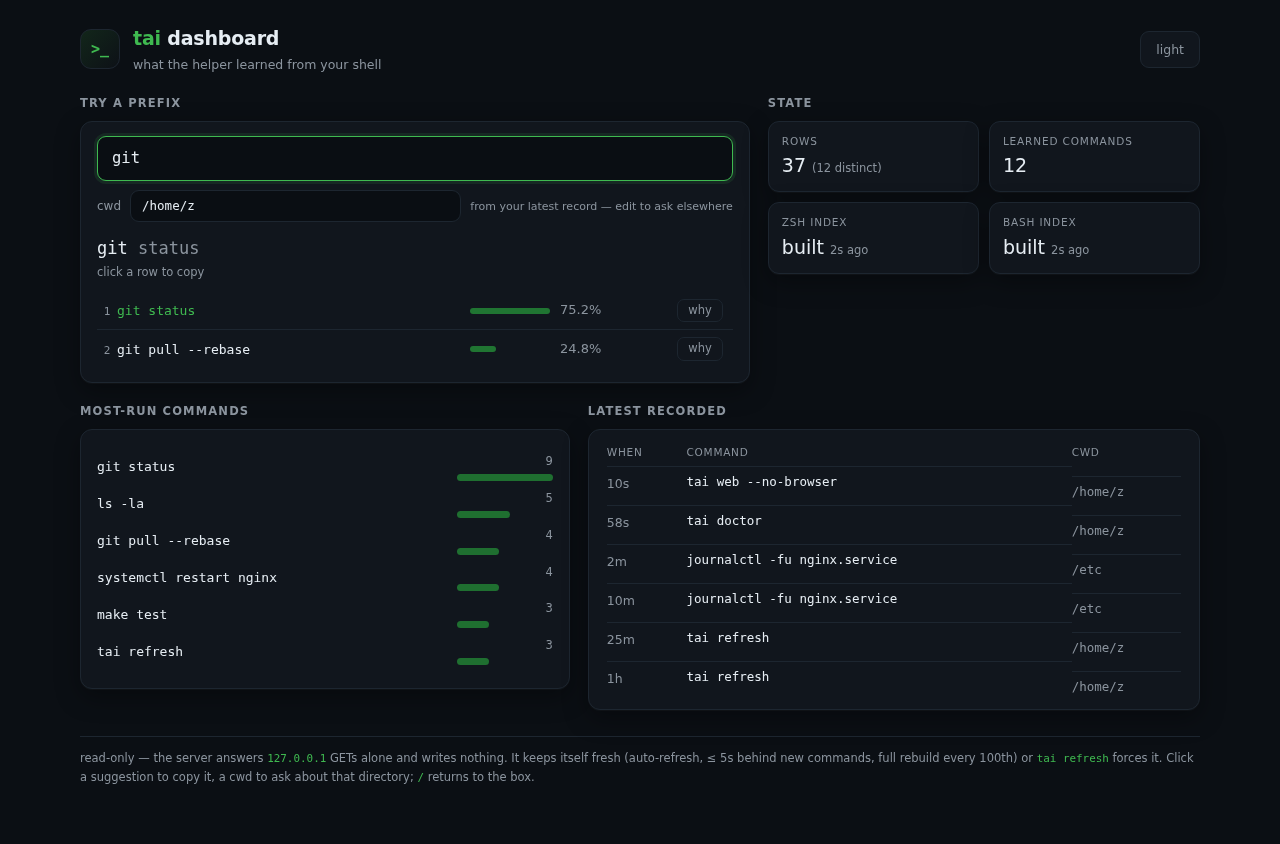
The one server in the product: you start it, it binds 127.0.0.1, it answers GETs only, and it can write nothing.
Commands
tai refresh     # import new history rows, then rebuild the indexes
tai discover    # learn --help from installed tools (cached, ~5-35s)
tai doctor      # what is indexed, and what is held back
tai bench       # build time, latency, memory, each shell's index read time
tai web         # a read-only localhost dashboard (alias: tai dashboard)
tai eval        # candidate coverage against your own history
tai update      # newest version — GitHub for a checkout, npm for an npm install (alias: tai upgrade)
tai version     # this install's release, and where the shell plugin is wired
tai purge       # drop unusable rows, then rebuild
tai forget git sta   # drop every stored row for a command, exactly as typed
tai uninstall   # remove everything tai added
No restart is needed after any of them: the plugin re-reads the index at the next prompt.